Posts

Relative and Absolute Cell References
Image
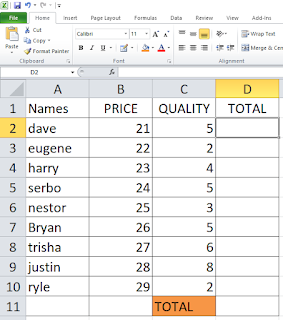
Relative Reference When copied across multiple cells, they change based on the relative position of rows and columns. To create and copy a formula using relative references: In the following example, we want to create a formula that will multiply each item's  price  by the  quantity . Select the Cell That we will contain the formula, well we select the Cell D2 2. Enter the Formula in Cell D2 to calculate the value. 3. Press the Enter to calculate the formula you entered 4.  Locate the  fill handle  in the lower-right corner of the desired cell. 5. Click and hold the fill hundle from D2 down to D10 6. Release the mouse and the formula will be copied and the values will be calculate. ABSOLUTE CELL REFERENCE Select the cell will contain the formula Enter the Formula in Cell D2 to calculate the value

MICROSOFT EXCEL

Image
MICROSOFT EXCEL Microsoft Excel is a software program produced by Microsoft that allows users to organize, format and calculate data with formulas using a spreadsheet system. This software is part of the Microsoft Office suite and is compatible with other applications in the Office suite. Techopedia explains  Microsoft Excel Excel is a commercial spreadsheet application produced and distributed by Microsoft for Microsoft Windows and Mac OS. It features the ability to perform basic calculations, use graphing tools, create pivot tables and create macros. Excel has the same basic features as all spreadsheet applications, which use a collection of cells arranged into rows and columns to organize and manipulate data. They can also display data as charts, histograms and line graphs. Excel permits users to arrange data so as to view various factors from different perspectives. Visual Basic is used for applications in Excel, allowing users to create a variety of complex ...

RESEARCH

Research               - is a systematic inquiry that attempts to provide solutions to existing problems and questions using facts and data. What are research skills that you neeed to develop? 1. Check your Sources. CURRENCY   -  Watch the new updates of the post or find new publish. SECURITY  - Don't Give too much information about you to a sites. CONTENT  - Find an legit information for your topic. AUTHORITY  - Be sure the author of the topic or posted in a sites are legits.  2. Ask a Good Question.  Ask an Question that can direct to your topic. 3. Go Beyond the Surface. Find an Specific answers to your research or Don't stay in one sites find another sites to get better information 4. Be Patient  Be Patient to find the best information and legit information. 5. Respect Ownership. To respect who publish gives credits to be respecting. 6. Use your Netwo...